<?xml version="1.0" encoding="utf-8"?>
<feed xmlns="http://www.w3.org/2005/Atom">
    <id>https://400808.xyz</id>
    <title>般若</title>
    <updated>2023-03-07T01:50:20.873Z</updated>
    <generator>https://github.com/jpmonette/feed</generator>
    <link rel="alternate" href="https://400808.xyz"/>
    <link rel="self" href="https://400808.xyz/atom.xml"/>
    <subtitle>Real konws Real</subtitle>
    <logo>https://400808.xyz/images/avatar.png</logo>
    <icon>https://400808.xyz/favicon.ico</icon>
    <rights>All rights reserved 2023, 般若</rights>
    <entry>
        <title type="html"><![CDATA[自建短链服务 Url-Shorten-Worker]]></title>
        <id>https://400808.xyz/post/zi-jian-duan-lian-fu-wu-url-shorten-worker/</id>
        <link href="https://400808.xyz/post/zi-jian-duan-lian-fu-wu-url-shorten-worker/">
        </link>
        <updated>2023-03-06T06:08:29.000Z</updated>
        <content type="html"><![CDATA[<h2 id="url-shorten-worker">Url-Shorten-Worker</h2>
<p>A URL Shortener created using Cloudflare Worker</p>
<h2 id="api">API</h2>
<p><a href="API.md">API Documentation (API文档)</a></p>
<h1 id="getting-start">Getting start</h1>
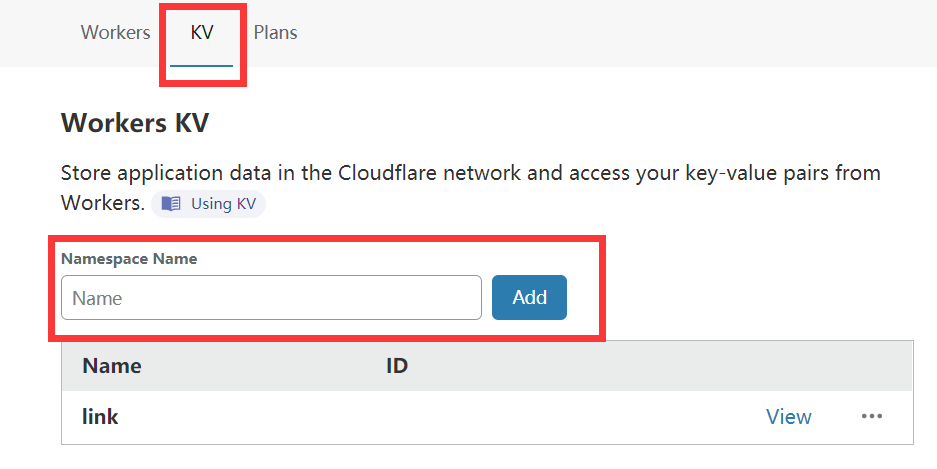
<h3 id="去workers-kv中创建一个命名空间">去Workers KV中创建一个命名空间</h3>
<p>Go to Workers KV and create a namespace.</p>
<img src="https://cdn.jsdelivr.net/npm/imst@0.0.4/20201205232805.png">
添加一个条目Entry 密钥key为password，值value为一个随机字符串
value为/登陆值
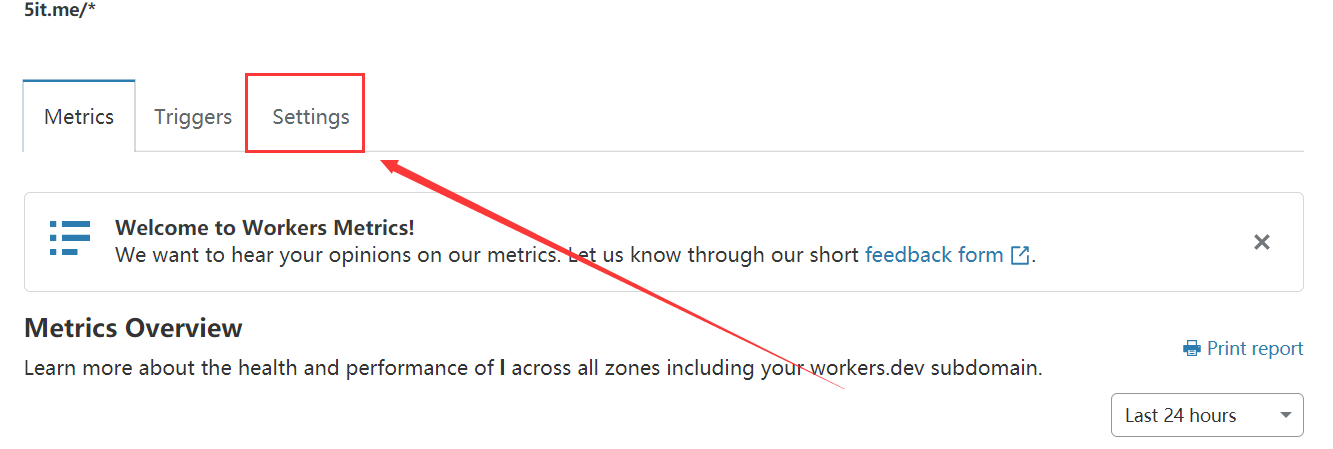
### 去Worker的Settings选选项卡中绑定KV Namespace
<p>Bind an instance of a KV Namespace to access its data in a Worker.</p>
<img src="https://cdn.jsdelivr.net/npm/imst@0.0.4/20201205232536.png">
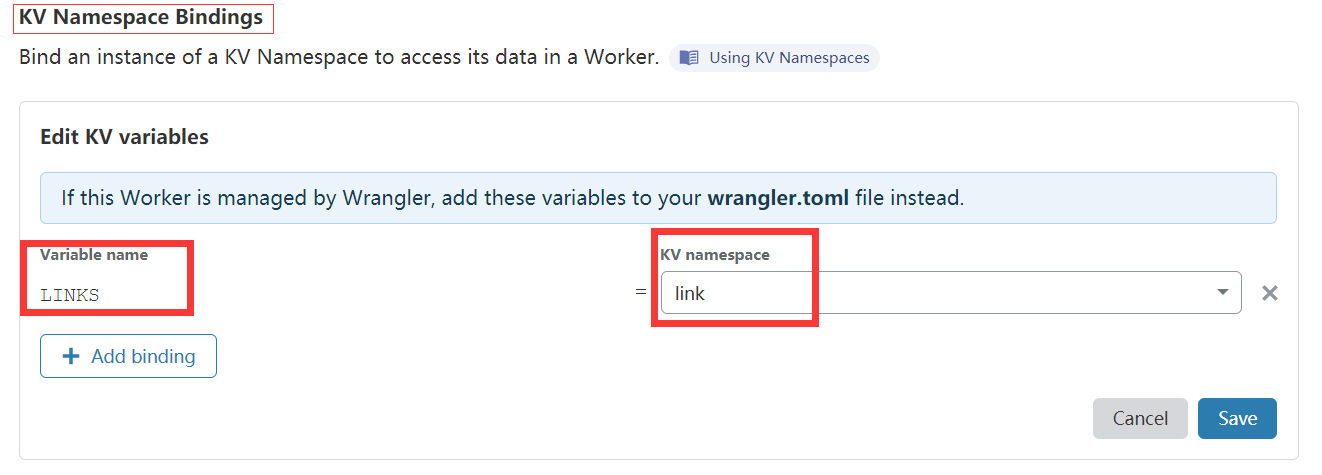
<h3 id="其中variable-name填写links-kv-namespace填写你刚刚创建的命名空间">其中Variable name填写<code>LINKS</code>, KV namespace填写你刚刚创建的命名空间</h3>
<p>Where Variable name should set as <code>LINKS</code> and KV namespace is the namespace you just created in the first step.</p>
<img src="https://cdn.jsdelivr.net/npm/imst@0.0.4/20201205232704.png">
<h3 id="复制本项目中的indexjs的代码到cloudflare-worker">复制本项目中的<code>index.js</code>的代码到Cloudflare Worker</h3>
<p>Copy the <code>index.js</code> code from this project to Cloudflare Worker.</p>
<p>new index.js  https://github.com/crazypeace/Url-Shorten-Worker/blob/main/index.js</p>
<h3 id="点击save-and-deploy">点击Save and Deploy</h3>
<p>Click Save and Deploy</p>
<p>你可以通过在你自己的域名下worker页面添加一个路由指向worker的方式来实现比如 域名/value 替代 cf.workers.dev/value的效果。</p>
<p>如果你想使用原版，worker里面的脚本使用 https://github.com/xyTom/Url-Shorten-Worker/blob/main/index.js 的内容</p>
<h1 id="demo">Demo</h1>
<p>https://lnks.tools/</p>
<p>Note: Because someone abuse this demo website, all the generated link will automatically expired after 24 hours. For long-term use, please deploy your own.</p>
<p>注意：所有由Demo网站生成的链接24小时后会自动失效，如需长期使用请自行搭建。</p>
]]></content>
    </entry>
    <entry>
        <title type="html"><![CDATA[自建clash在线订阅转换]]></title>
        <id>https://400808.xyz/post/zi-jian-clash-zai-xian-ding-yue-zhuan-huan/</id>
        <link href="https://400808.xyz/post/zi-jian-clash-zai-xian-ding-yue-zhuan-huan/">
        </link>
        <updated>2023-03-06T06:07:34.000Z</updated>
        <content type="html"><![CDATA[<h2 id="前言">前言</h2>
<p>​		clash这个科学上网的客户端很强大也很麻烦,和我们平常使用的V2rayN、winxray、ssr不一样，其不能直接添加单个节点,添加节点只能通过配置文件添加,而且这个配置文件的格式会随着clash版本更新变化.<br>
​		所以为了方便使用,很多网站提供了在线订阅地址转换的服务.但是很多这样的在线订阅地址转换存在节点信息泄露的问题.</p>
<p>​		对于这样一个问题,我们可以通过自建订阅转换的方法来解决.这里有两种思路一个是在本地建一个订阅转换的服务,自己在本地使用.<br>
另外一个是搭建一个类似的在线网站,自己拥有全部权限.</p>
<p>​		本文介绍第二种方法--搭建一个在线订阅地址转换网站.</p>
<h2 id="准备工作">准备工作</h2>
<p>1 / 两个邮箱，用来注册heroku，推荐使用临时邮箱</p>
<p>2/ 个常用邮箱用了注册前端服务网站</p>
<p>这次推荐使用render   https://render.com/<br>
​</p>
<h2 id="开始搭建">开始搭建</h2>
<p>一/ 后端搭建</p>
<p>github 项目地址:  https://github.com/jth445600/subconverter-heroku</p>
<p>注册 heroku 使用 临时邮箱注册两个账号 并且获取api</p>
<p>heroku官网<br>
https://dashboard.heroku.com/apps</p>
<p>使用cf进行反代,并且解决heroku免费账户550小时的问题.</p>
<p>解决方案就是 需要创建两个容器 单双号交替使用.和以前的heroku-v2ray的处理方式是一样的.</p>
<pre><code class="language-javascript">const SingleDay = '应用程序名1.herokuapp.com'
const DoubleDay = '应用程序名2.herokuapp.com'
addEventListener(
    &quot;fetch&quot;,event =&gt; {
    
        let nd = new Date();
        if (nd.getDate()%2) {
            host = SingleDay
        } else {
            host = DoubleDay
        }
        
        let url=new URL(event.request.url);
        url.hostname=host;
        let request=new Request(url,event.request);
        event. respondWith(
            fetch(request)
        )
    }
)
</code></pre>
<p>搭建完woker之后,就可以配置前端了.</p>
<p>二/ 前端</p>
<p>前端使用免费的静态网页服务厂商来搭建.这里推荐使用render</p>
<p>注册 render</p>
<p>https://render.com/</p>
<p>打开这个网站,有自己的邮箱注册就行了,不用绑定信用卡,可以免费使用</p>
<p>也可以使用 cloudflare page</p>
<p>打开cloudflare的官网  www.cloudflare.com</p>
<p>github 项目地址: https://github.com/jth445600/sub-web</p>
<p>修改默认后端地址<br>
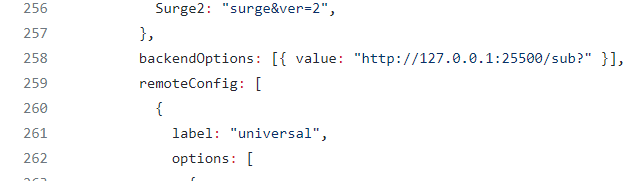
找到 sub-web/src/views/Subconverter.vue 文件</p>
<p>找到 258行 backendOptions: ，替换后面的 http://127.0.0.1:25500/sub? 为 修改刚才搭建的woker的地址<br>
fork之后,修改一下<br>
<img src="https://cdn.jsdelivr.net/gh/jth445600/picgo@master/img/20211120132246.png" alt="20211120132246" loading="lazy"></p>
<p>修改刚才搭建的woker的地址</p>
<p>最后就是部署到render就可以了</p>
]]></content>
    </entry>
    <entry>
        <title type="html"><![CDATA[Hello Gridea]]></title>
        <id>https://400808.xyz/post/hello-gridea/</id>
        <link href="https://400808.xyz/post/hello-gridea/">
        </link>
        <updated>2018-12-11T16:00:00.000Z</updated>
        <summary type="html"><![CDATA[<p>👏  欢迎使用 <strong>Gridea</strong> ！<br>
✍️  <strong>Gridea</strong> 一个静态博客写作客户端。你可以用它来记录你的生活、心情、知识、笔记、创意... ...</p>
]]></summary>
        <content type="html"><![CDATA[<p>👏  欢迎使用 <strong>Gridea</strong> ！<br>
✍️  <strong>Gridea</strong> 一个静态博客写作客户端。你可以用它来记录你的生活、心情、知识、笔记、创意... ...</p>
<!-- more -->
<p><a href="https://github.com/getgridea/gridea">Github</a><br>
<a href="https://gridea.dev/">Gridea 主页</a><br>
<a href="https://fehey.com/">示例网站</a></p>
<h2 id="特性">特性👇</h2>
<p>📝  你可以使用最酷的 <strong>Markdown</strong> 语法，进行快速创作</p>
<p>🌉  你可以给文章配上精美的封面图和在文章任意位置插入图片</p>
<p>🏷️  你可以对文章进行标签分组</p>
<p>📋  你可以自定义菜单，甚至可以创建外部链接菜单</p>
<p>💻  你可以在 <strong>Windows</strong>，<strong>MacOS</strong> 或 <strong>Linux</strong> 设备上使用此客户端</p>
<p>🌎  你可以使用 <strong>𝖦𝗂𝗍𝗁𝗎𝖻 𝖯𝖺𝗀𝖾𝗌</strong> 或 <strong>Coding Pages</strong> 向世界展示，未来将支持更多平台</p>
<p>💬  你可以进行简单的配置，接入 <a href="https://github.com/gitalk/gitalk">Gitalk</a> 或 <a href="https://github.com/SukkaW/DisqusJS">DisqusJS</a> 评论系统</p>
<p>🇬🇧  你可以使用<strong>中文简体</strong>或<strong>英语</strong></p>
<p>🌁  你可以任意使用应用内默认主题或任意第三方主题，强大的主题自定义能力</p>
<p>🖥  你可以自定义源文件夹，利用 OneDrive、百度网盘、iCloud、Dropbox 等进行多设备同步</p>
<p>🌱 当然 <strong>Gridea</strong> 还很年轻，有很多不足，但请相信，它会不停向前 🏃</p>
<p>未来，它一定会成为你离不开的伙伴</p>
<p>尽情发挥你的才华吧！</p>
<p>😘 Enjoy~</p>
]]></content>
    </entry>
</feed>